

As someone navigating the world with AuDHD, finding a system to stay organized has always felt like an uphill battle. I have cycled through countless methods and tools, but most of them failed to stick. Recently, I developed a workflow that actually works for me. I wanted to share it for anyone else who feels like traditional productivity advice just isn’t built for their brain.
The Core Principle: Friction is the Enemy
My main goal with this workflow was to reduce every possible friction point. If a system requires too many clicks or too much mental effort to start, my brain will simply ignore it.
Why Traditional Systems Failed Me
Most conventional systems are too rigid. They create a harsh “pass or fail” mentality that leads straight to burnout. I needed a system that could bend without breaking whenever my focus shifted.
1. The Claustrophobia of Calendars
Calendars often feel like an overwhelming chore. I found that exact dates fail to give me a real sense of time. Instead, they feel claustrophobic. I eventually realized that a countdown system works wonderfully for me, giving me a much better grasp on deadlines than a static grid of dates.
2. The Overwhelm of To-Do Apps
To-do apps are great in theory, but they often lead straight to analysis paralysis. Opening an app just to list a task can feel like a massive hurdle. I also tend to overcomplicate my lists, which results in a digital pile of tasks that I eventually avoid entirely.
What Actually Sticks
1. Google Keep for Low-Stakes Entry
Google Keep is the only note-taking app that has ever worked for me because its simplicity is its strength. I can quickly jot down ideas or set reminders easily. It functions as a simple digital scratchpad that is always available on any device, making it the perfect entry point for my thoughts.
2. The Social Brain Dump
I realized I need a way to get thoughts out of my head immediately. One of my most consistent habits is “brain dumping” via quick updates to my best friend. Telling someone else what I’m doing provides a wonderful sense of accountability and connection. It beautifully turns the act of organizing into a fun social interaction.
3. AI As a Productivity Partner
At first, I hesitated to use AI due to concerns about its environmental impact and mindless over-use. However, after exploring it a bit, I discovered how incredibly helpful AI can be for an ADHD brain. It guides me through tasks one step at a time, drastically reducing my decision fatigue. By handing off tedious and menial tasks to AI, I can keep full creative control and focus entirely on big-picture concepts.
Mindset Change
Tools are only as effective as the habits they support. However much you strive to build the perfect system, it’s your mind that needs to gradually change along with it. Here are some integral mindset changes that have helped me greatly.
1. Overcoming the All-or-Nothing Mentality
I often find myself procrastinating because I want my work to be absolutely perfect. This expectation creates a massive barrier to entry, acting exactly like heavy static friction that prevents a block from moving. Lately, I have been making a conscious effort to shift this mindset.
A quote that always sticks with me is:
Fear killed more dreams than failure ever did.
This reminder helps me reassess my choices whenever I get stuck in a loop of executive dysfunction. It reminds me that my own fear of failure is the primary force holding me back. By intentionally lowering my expectations for the first draft, I give myself permission to just keep moving forward.
2. Just Laying the Foundation
Telling someone to “just start” is easy, but doing it with ADHD is incredibly challenging. My brain naturally demands perfection from the very first second. To get around this hurdle, I now delegate the actual act of starting to AI.
I use brain-dump prompts to let the AI lay down the initial foundation. Once I see those messy ideas take a physical shape on the screen, my momentum builds, and I can easily step in to refine, edit, and polish the text. I used to feel like I was cheating whenever I relied on AI this way. Over time, I have realized that navigating the world with a neurodivergent brain means embracing support. I view these tools as a valuable way to level the playing field.
3. Play to Your Strengths (You Can’t Excel at Everything)
One of my biggest hurdles has been the urge to understand every single detail. I used to experience intense imposter syndrome whenever I completed a task without fully mastering the underlying theory. Eventually, I realized that sustaining that level of pressure was impossible.
I choose to accept that my time is limited, my daily energy can be unpredictable, and living with AuDHD means my brain works differently. Handing certain tasks over to AI can sometimes feel like a setback, but I view it as a smart strategy to save my energy for the bigger picture. I love generating ideas, journaling, and tracking my habits or expenses. When those records get overwhelming, I let AI tidy up the chaos. My primary goal is simply to document my personal journey, and utilizing AI is a wonderful, practical way to make that sustainable.
Synthesizing the System: The Bridge to Obsidian
This is the technical side of how I brought this system to life. I collaborated with Claude AI to build the entire setup from scratch. I started by creating a fresh vault in Obsidian, opened Claude in my command line interface, and began prompting it with ideas for the workflow I wanted to create. After a great brainstorming session, we figured out that a custom Telegram bot would be the perfect bridge for my needs.
The initial architectural discussion helped me map out the vault structure, as seen in the folder organization Claude suggested:
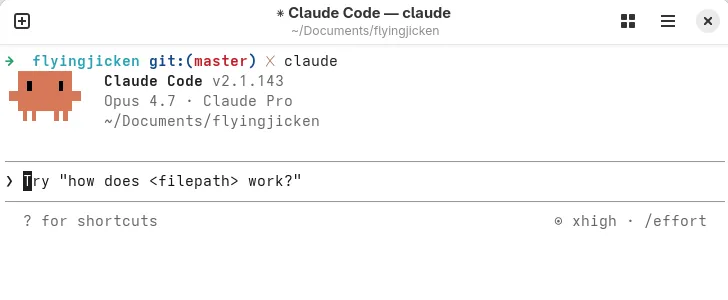 Figure 1: Launched the Claude CLI in my Obsidian vault folder (flyingjicken).
I also asked Claude to structure my Obsidian folders for me. Figuring out a folder hierarchy from scratch usually brings on massive decision fatigue, so having the AI generate a clean, ready-to-use framework was a lifesaver. It gave my notes a perfect, organized home before I even started sending data over, making the transition completely seamless.
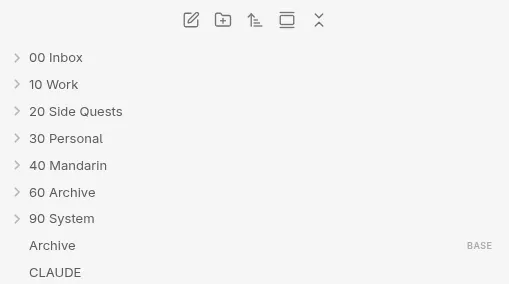 Figure 2: Obsidian folder structure.
I “vibe coded” (prompting AI to generate logic from high-level intentions and ‘vibes’) the Telegram bot with specific commands to handle all my basic tracking. Now, I can log my expenses, to-dos, habits, and upcoming events all inside a single, low-pressure chat room.
The final interface is intentionally simple, mimicking a casual conversation while collecting structured data:
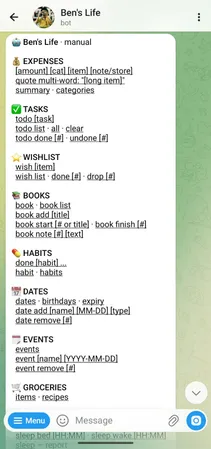
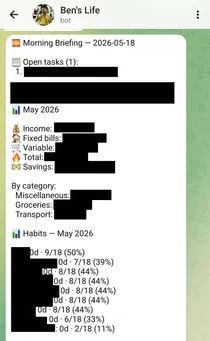
Figures 3 & 4: The simple Telegram command interface (left) and the resulting automated data summaries (right).
Here is how the tech stack handles the heavy lifting behind the scenes:
- The Brains: Every command I type into the chatbot gets processed instantly. The Worker validates the Telegram webhook, parses the command (like
/todoor/expense), and uses the GitHub API to append data to the correct markdown file in my repository. - The Engine: I use Cloudflare Workers as my serverless computing platform to handle the logic.
- The Storage: The worker automatically sends the data straight to GitHub, which serves as my central database.
The overall system architecture illustrates this seamless data flow:

Figure 5: The system architecture illustrating the flow from Telegram to Obsidian via Cloudflare and GitHub.
Because GitHub sits at the center, I can easily push and pull information using both my Telegram bot and my Obsidian vault (there’s a git community plugin for Obsidian).
This setup gives me the best of both worlds and it’s completely free. The Telegram bot serves as a lightweight dashboard for quick data entry on the go. Meanwhile, I keep Obsidian dedicated purely to long-term knowledge, deep idea development, and visualizing my data in a beautifully detailed layout. Keeping daily tracking in a chat format allows my Obsidian vault to stay light, clean, and completely stress-free. They’re all connected as my second brain, but each serves a different purpose.
Even though I have created this system, I still use Google Keep for my sporadic note taking and brain dumps.
Afterwords
This system has worked incredibly well for me, and I hope sharing my journey gives you some fresh inspiration if you are navigating these exact same challenges. Choosing to completely step away from traditional calendar systems has been incredibly liberating for me. Instead of forcing my brain to adopt standard tools just because they are popular, I decided to embrace what actually works for my unique wiring. We all deserve to build systems that support us, and sometimes the best way forward is to forge our own path. At the end of the day, finding a personalized workflow that synchronizes beautifully with your energy is the absolute key to thriving with our AuDHD brains.